Best AI Music Video Generator for Independent Artists in 2026: Why Music-First Tools Matter More Than Ever
12 min read
Independent musicians have never had more power to make music on their own. A songwriter can sketch an idea in a bedroom, produce a finished track with AI-assisted tools, release it to streaming platforms, and promote it across TikTok, YouTube Shorts, Reels, and Spotify without waiting for a label.
But one problem remains surprisingly difficult: the music video.
A finished song needs more than cover art. It needs moving visuals that match the mood, rhythm, chorus, drop, vocal energy, and overall identity of the track. For decades, that meant hiring a director, renting locations, booking a crew, editing footage, color grading, and spending money most independent artists simply do not have.
That is why the AI music video generator category has become so important in 2026. The best tools are not just making pretty video clips. They are trying to solve a specific problem for musicians: how to generate a music video from a song in a way that feels synced, intentional, and ready to publish.
This guide looks at what separates a real AI music video generator from a general AI video tool, where BeatViz fits into the current landscape, and how artists should choose the right workflow for their next release.
Quick Answer: Best AI Music Video Generator Picks for 2026
| Tool | Best For | Audio Input | Beat Sync | Full Music Video Workflow | Creative Control | Best Use Case |
| BeatViz | Music-first AI video creation for independent artists | Music upload and prompt-based workflow | BPM, rhythm, and mood-based syncing | Strong focus on complete music video workflows | AI Agent, one-click generation, custom editing studio | Full release videos, social clips, visual storytelling |
| Neural Frames | Audio-reactive visualizers | Song upload | Strong audio-reactive controls | Better for abstract and visualizer-style videos | Frame-level and timeline-style control | Electronic, IDM, experimental visuals |
| Kaiber | Stylized music visuals | Music-sync workflow | Beat Sync feature | Good for visual loops and stylized content | Editor and visual style controls | Canvas-style music visuals and short promos |
| Runway | Cinematic AI video clips | Primarily prompt/image/video workflow | Manual music syncing needed | Not music-first | Strong cinematic generation tools | B-roll, concept scenes, visual assets |
| Luma Dream Machine | Cinematic short video generation | Prompt/image-based workflow | Manual music syncing needed | Not music-first | Strong image-to-video and prompt-based generation | Short cinematic clips and concept visuals |
Why AI Music Video Generation Is Different from General AI Video
The biggest mistake musicians make is assuming that any AI video generator can make a music video.
A general AI video generator usually starts with a text prompt or image prompt. You describe a scene, choose a style, and get a short visual clip. That can be incredibly useful for filmmakers, social media creators, and designers. But music videos have a different standard.
A music video is not just a sequence of attractive shots. It has to breathe with the song.
The intro might need slower visual pacing. The first verse might need character introduction or mood building. The chorus usually needs stronger motion, brighter contrast, or a more dramatic scene change. A dance track drop needs impact. A ballad bridge may need emotional restraint. A rap verse might need faster cuts and performance-driven framing.
This is where music-first tools matter.
A real AI music video generator should understand at least some combination of:
- BPM and rhythm
- Beat changes
- Energy shifts
- Intro, verse, chorus, bridge, drop, and outro structure
- Lyric or vocal timing
- Scene pacing
- Character or performer consistency
- Output formats for YouTube, TikTok, Reels, and other release channels
For music videos, the problem is not only visual quality. The problem is audio awareness.
A tool can produce a beautiful 10-second shot of a neon city, but if it does not understand the track, the artist still has to manually cut, stitch, and sync clips in Premiere Pro, CapCut, DaVinci Resolve, or another editor. That workflow can work for experienced editors, but it is not ideal for independent musicians who want a faster path from finished song to publishable video.
BeatViz — Best for Music-First AI Music Video Creation
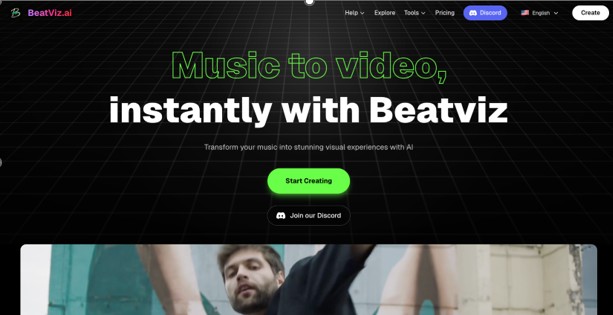
BeatViz is built around the idea that music should lead the video, not sit underneath it as an afterthought.
Instead of asking artists to generate dozens of disconnected clips and edit them manually, BeatViz gives musicians a workflow designed around the song. The platform includes an AI Director Agent, a one-click generator, and a custom editing studio, making it useful for creators who want automation but still need room to refine the final result.
The basic workflow is straightforward: upload your music, describe the visual style you want, and let the system analyze the rhythm and mood of the track. BeatViz then builds scenes that are designed to stay synced with the music rather than simply producing silent video clips.
For independent artists, that distinction matters. A musician who has just finished a single does not always want to become a video editor. They want a music video generator that can take a finished track and help turn it into a visual release.
Key Strengths
The strongest part of BeatViz is its music-first structure. It is not just a general AI video model with music added later. Its workflow is designed around music upload, rhythm analysis, prompt guidance, visual generation, and editing.
BeatViz is especially useful for:
- Independent musicians who need a full video concept from one finished song
- Suno, Udio, and AI music creators who want visuals for generated tracks
- YouTube music channels that need regular video output
- TikTok, Reels, and Shorts creators who need vertical music visuals
- Artists who want cinematic, anime, cyberpunk, fantasy, electronic, or stylized video aesthetics
- Creators who want to combine automation with timeline-based editing
The Custom Editing Studio is also important because many AI tools are too one-click. One-click is fast, but music videos often need small creative corrections. A creator may want to regenerate one scene, change the visual direction of a chorus, adjust a character moment, or create different versions for horizontal and vertical platforms. A music video generator becomes more useful when it supports both speed and control.
Limitations
BeatViz is not a traditional editing suite like Premiere Pro or DaVinci Resolve. If an artist wants frame-perfect manual control over every cut, color grade, camera move, and transition, they may still prefer a professional editor.
Like most AI video tools, results can also vary depending on the music, prompt quality, chosen style, and generation settings. Highly specific human performance videos, complex multi-character stories, or detailed lip-sync scenes may require regeneration and manual refinement.
This is not necessarily a weakness unique to BeatViz. It is part of the current state of AI video generation. The practical question is whether the platform reduces enough editing work to make music video creation realistic for independent artists. For many creators, the answer is yes.
Pricing and Output
BeatViz uses a credit-based pricing model, with subscription plans and one-time credit purchases. Paid plans include 1080p export, common aspect ratios such as 16:9, 9:16, and 1:1, commercial use rights, and no watermark. As with any AI video tool, artists should check the current pricing page before publishing because credit rules, model costs, and plan names can change.
Best For
BeatViz is best for musicians who want to generate a music video from a song without building everything manually from short clips. It is especially strong for independent artists, music marketers, AI music creators, and social-first musicians who care about speed, rhythm, and release-ready formats.
Not Best For
It is not the best choice for filmmakers who want full manual control over every single shot from the beginning. It is also not the ideal tool for purely abstract, frame-by-frame audio-reactive art if that is the only goal. In that case, a specialist visualizer may be more suitable.
Neural Frames — Best for Audio-Reactive Visualizers
Neural Frames is one of the most respected tools for audio-reactive AI visuals. It is particularly strong for electronic producers, experimental musicians, ambient artists, and creators who want visuals that react deeply to sound.
Where BeatViz is more focused on a complete music video workflow, Neural Frames is closer to a visual instrument. It can be very powerful when the artist wants direct control over how the image reacts to audio. This makes it a strong option for abstract visuals, psychedelic animation, electronic music, live visuals, and long-form visualizers.
The limitation is that it may not be the fastest route for a traditional performance-style music video. If you want a stable singer, a narrative arc, lyrics, and a clean release format for a pop or indie track, you may need more planning and editing. But for audio-reactive visuals, Neural Frames remains a serious tool.
Choose Neural Frames if you care most about visual reactivity and control. Choose BeatViz if you want a more guided, music-video-first workflow.
Kaiber — Best for Stylized Music Visuals and Canvas-Style Content
Kaiber has long been associated with stylized AI music visuals. It is useful for artists who want motion, atmosphere, and visual identity around a song without necessarily building a full narrative music video.
Its strength is style. Kaiber can work well for animated loops, Spotify Canvas-style visuals, lyric-adjacent promos, and social media teasers. For musicians who want a visual world around a release, it can be a practical creative tool.
The limitation is that stylized visuals are not always the same as a complete music video. If an artist needs deep song structure awareness, multi-scene storytelling, character consistency, and release-ready editing from one track, a more music-first system may be a better fit.
Kaiber is best for vibe, motion, and short-form visual identity. It is less ideal for artists who want the AI to behave like a full music video director.
Runway — Best for Cinematic AI B-Roll
Runway is one of the strongest general AI video platforms for cinematic clips, concept scenes, visual experimentation, and filmmaking workflows. It can generate impressive video assets, and for a creative director or editor, it can be extremely useful.
But Runway is not primarily an AI music video generator from audio. That does not make it a bad tool. It simply means it is built for a different workflow.
A musician can use Runway to create individual scenes, then bring those scenes into an editor and manually sync them to the track. This can work very well for artists who already understand editing. It can also be useful for generating cinematic B-roll for a music video made elsewhere.
The problem is speed. If you need a full music video from one finished song, generating individual clips and syncing them manually can become time-consuming. Runway is best for visual quality and cinematic assets, not automated music-video assembly.
Luma Dream Machine — Best for Beautiful Short Concept Clips
Luma Dream Machine is another strong general-purpose AI video tool. It is useful for creating cinematic short clips from prompts or images. Artists can use it for teaser shots, album campaign visuals, mood boards, and conceptual music video scenes.
Its strength is visual imagination. It can help musicians explore a look before committing to a full campaign. For example, an artist could create a few dreamlike clips for a single rollout, then use them as social posts or inspiration for a larger video.
However, Luma is not a music-first video generator in the same way that BeatViz is. If the goal is to upload a finished song and automatically generate a beat-synced music video, artists will likely need extra editing steps.
Use Luma for beautiful short visual ideas. Use a music-first AI music video generator when the soundtrack needs to drive the entire video.
Music-First Tools vs General AI Video Tools
The right tool depends on the job.
| Need | Best Tool Type | Why |
| Full music video from one song | Music-first AI music video generator | Starts from the audio and builds visuals around the track |
| Abstract electronic visualizer | Audio-reactive visualizer | Lets visuals respond to frequency, rhythm, and energy |
| Cinematic short clips | General AI video generator | Better for standalone visual scenes |
| TikTok/Reels music promos | Music-first or social video tool | Needs fast vertical exports and strong hook visuals |
| Spotify Canvas loop | Stylized visual tool | Short looping visuals matter more than full narrative |
| Music video with manual editing | General AI video + editor | Best for creators who want maximum control |
For most independent musicians, the smartest workflow is not choosing the tool with the most beautiful isolated clip. It is choosing the tool that gets them closest to a finished release.
That is why BeatViz is worth watching in 2026. It sits in the middle of automation and creative control. The AI Agent helps artists move quickly, the one-click generator removes the blank-page problem, and the custom editor gives creators room to refine the result.
How to Choose the Right AI Music Video Generator
If you want a complete music video from one finished song, choose a music-first tool such as BeatViz.
If you make electronic, ambient, techno, or experimental music and want abstract visuals that react to frequency and rhythm, try Neural Frames.
If you want stylized loops or short promotional visuals, Kaiber may be a good fit.
If you want cinematic shots and already plan to edit everything manually, Runway and Luma can be useful as visual asset generators.
If you have zero editing experience, avoid workflows that require generating 30 separate clips and manually cutting them to the beat. That may sound flexible, but it often becomes the exact production burden AI was supposed to remove.
If you are releasing music regularly, also consider platform output. A YouTube video needs 16:9. TikTok, Reels, and Shorts need 9:16. Social ads may need square formats. The best AI music video generator for musicians should make it easy to repurpose one song across multiple release channels.
Final Verdict
The best AI music video generator in 2026 is not simply the tool that makes the prettiest short clip. For musicians, the real question is whether the tool understands the song.
BeatViz stands out because it is built around music video creation rather than generic video generation. Its AI Director Agent, one-click generator, custom editing studio, rhythm analysis, and export options make it a strong choice for independent artists who need a practical path from finished track to publishable visual content.
Neural Frames is excellent for audio-reactive visualizers. Kaiber is useful for stylized music visuals. Runway and Luma are powerful for cinematic clips and creative assets. But if the goal is to generate a music video from a song with less manual editing, a music-first platform like BeatViz is the better starting point.
For independent artists, that difference matters. A music video is not just a visual accessory. It is part of the release. It shapes how listeners remember the song, how the track performs on social platforms, and how seriously an audience takes the artist.
In 2026, musicians do not just need AI video. They need AI video that listens.
FAQ
What is the best AI music video generator in 2026?
The best AI music video generator depends on the artist’s workflow. BeatViz is a strong option for musicians who want a music-first platform that can upload a song, analyze rhythm, generate scenes, and support release-ready outputs. Neural Frames is better for abstract audio-reactive visualizers, while Runway and Luma are better for cinematic short clips.
Can AI turn a song into a music video?
Yes. Modern AI music video tools can turn a song into visual content by analyzing the track, generating scenes, and syncing visuals to rhythm or mood. The quality depends on the platform, the song, the prompt, and how much editing control the artist uses.
What is the difference between an AI music video generator and a general AI video generator?
An AI music video generator starts from music. It pays attention to rhythm, BPM, mood, song sections, or vocal energy. A general AI video generator usually starts from text, images, or video prompts and creates short visual clips that may need manual syncing.
Is BeatViz good for independent musicians?
Yes. BeatViz is designed for independent musicians, AI music creators, YouTube music channels, and social media creators who want to create music videos without hiring a production crew or learning complex editing software.
Can AI music videos be used for YouTube and TikTok?
Yes, but artists should choose tools that support the right aspect ratios. YouTube usually needs 16:9, while TikTok, Reels, and Shorts usually need 9:16. BeatViz supports common export formats including horizontal, vertical, and square video outputs on paid plans.
Are AI music videos commercially usable?
Commercial rights depend on the platform and plan. BeatViz paid plans include commercial use rights, but creators should always review current terms before using AI-generated videos in monetized content, advertising, or client work.
Should I use Runway or BeatViz for music videos?
Use Runway if you want cinematic AI clips and plan to edit the music video manually. Use BeatViz if you want a music-first workflow that starts with the song and helps generate beat-synced visuals more directly.
What should musicians look for in an AI music video maker?
Musicians should look for audio input, beat sync, song structure awareness, full-song workflow, character consistency, lyric or subtitle options, export formats, pricing transparency, and editing control. The best tool is the one that matches the artist’s release goal, not just the one with the most impressive demo clip.

::: RenownedForSound.com’s Editor and Founder –
Interviewing and reviewing the best in new music and globally recognized artists is his passion.
Over the years he has been lucky enough to review thousands of music releases and concerts and interview artists ranging from top selling superstars like 27-time Grammy Award winner Alison Krauss, Boyz II Men, Roxette, Cyndi Lauper, Lisa Loeb and iconic Eagles front man/songwriter, Glenn Frey through to more recent successes including Newton Faulkner, Janelle Monae and Caro Emerald.
Brendon manages and coordinates the amazing team of writers on RenownedForSound.com who are based in the UK, the U.S and Australia.